
Meet Mai…
Tassomai’s AI-powered tutor
Mai is here to help Tassomai students with their quizzes, providing hints and explanations, but never giving away the actual answer!
This exciting addition to Tassomai harnesses the power of AI and puts a virtual tutor into the hands of learners.
“It really helps you figure out a question when you're stumped and I overall just love this new feature and think it is amazing."
- Student feedback

How does Mai work?
Tassomai users with access to Mai will see the Mai icon on most of their quiz questions.
Clicking on ‘Mai Help’ opens a chat screen where students can choose from pre-prepared prompts or type their own questions. Mai won’t give away the actual answer, and can’t be distracted by off-topic or inappropriate questions!
If a student gets a multiple-choice question wrong, they can click ‘Mai Explain’ and Mai will explain why their answer is incorrect. These detailed explanations can also be reviewed later via a learner’s Tassomai Tree.
Who can access Mai?
All private subscriptions include full access to Mai, and families can put Mai to the test in their 7 day free trial.
When students get Tassomai through their schools they are limited to 2 ‘Mai Helps’ and 2 ‘Mai Explains’ chats per week, but school users’ parents have the option to upgrade to ‘Mai Unlimited’.
School users can have up to 4 conversations per week with Mai (2 x Mai Help and 2 x Mai Explain), with a maximum of 10 messages in each chat. Private subscribers have unlimited access to Mai.
There's a cost to Tassomai each time a learner interacts with Mai which we haven’t passed on to schools. In the case of our private subscribers this cost is easily covered by their monthly fees, however schools pay a much lower price per student and for this reason we’ve had to cap the number of interactions that school users have with Mai.
School parents have the option to upgrade to ‘Mai Unlimited’ for a fee of £3.99 per month. This gives families who get Tassomai through school the same level of access to Mai as our private subscribers, but at a heavily discounted rate.
We are currently exploring options for Pupil Premium families to ensure they are also able to access Mai.
Tassomai’s private subscribers and ’Mai Unlimited’ subscribers will notice the Mai icon on almost every quiz question, for every subject in the top right hand corner.
Learners who get Tassomai through their schools who haven’t upgraded to Mai Unlimited will only see the Mai icon on new or correction questions (the ones a student got wrong before). These are the question types where we believe conversations with Mai will be most beneficial.
Yes, we think so! Mai isn’t the same as a real person, but Mai can do a great deal of what a tutor does for a fraction of the cost. The big difference is that a student has to wait for their next session to see a tutor, by which time they will likely have forgotten most of what they were struggling with. Mai is available 24/7 ready to help students in the moment. We believe this ON-DEMAND aspect is a big advantage. We’ve also found the quality of Mai’s responses is consistently high.
We recommend parents try Mai with their children and ask Mai to explain a particular topic to judge Mai’s capabilities for themselves.
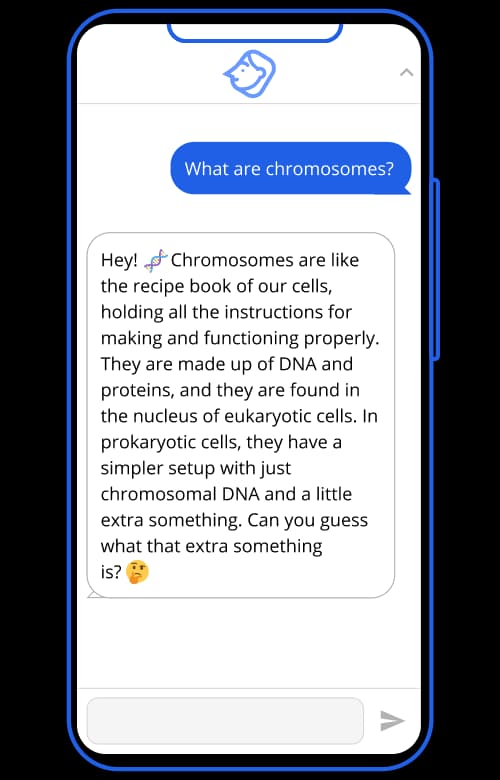
“It was amazing it helped me so much."
- Student feedback
"It is excellent. I like the fact that when prompted it will ask a series of questions which help in understanding. It even suggested a song to remember the facts."
- Faith, Parent
FAQs about Mai and AI
AI is shorthand for Artificial Intelligence, the leveraging of computers and machines to mimic the problem-solving and decision-making capabilities of the human mind. In the context of Large Language Models (LLMs), AI refers to advanced computer systems that have been trained on vast amounts of text data to understand and generate human-like text.
Mai was built using GPT3.5, a Large Language Model (LLM) based Artificial Intelligence that engages in human-like dialogue based on a series of prompts. It is designed to respond in a natural, intuitive way and has numerous applications. The company behind GPT is called OpenAI, an AI research company based in San-Francisco.
Yes, all conversations through the chat function will be stored on our system. We know Mai isn’t going to be perfect on every occasion, so it’s important for us to be able to check responses and review any conversations where trialists have flagged Mai’s answers. By analysing conversations Tassomai will be able to help Mai improve and become increasingly intuitive, supportive and engaging.
Mai has been programmed to keep conversations relevant and appropriate to students’ Tassomai quizzes. There’s also a moderation system in place whereby spamming, persistent inappropriate comments or questions from users are flagged and those users will have their access limited or blocked.
We appreciate parents may have concerns about AI, but it’s important to stress that Tassomai users are interacting with our AI tutor in a controlled environment. Other than a student’s first name, there is no other personally identifiable information shared with Mai / ChatGPT and Mai does not request any personal information from the student.
Yes, students and their parents/guardians can choose to deactivate the AI function through their account settings. Note parents need to access their Parent Dashboards if they wish to change any settings.
If you have a question about Mai which hasn’t been answered here, please don’t hesitate to contact us.
Put Mai to the test with a 7 day free family trial, or if you’re a teacher at a school that isn’t already using Tassomai, book a demo and we’ll show you Mai and Tassomai in action.